Controls
- WASD or arrow keys to move the camera
- Right mouse button + mouse movement to rotate the camera
- Mouse scroll to zoom-in/out
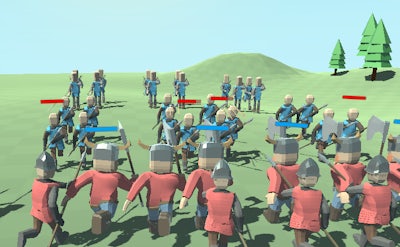


War Simulator is the go-to war strategy game for gamers seeking a realistic and immersive experience. As a player, you'll be in control of armies in campaign-style missions, where strategy and tactical thinking are crucial to defeating the opposing army and emerging victorious. With Pokid at the helm, you can expect a game that's both challenging and engaging, with a wide range of features to keep you hooked.
The game's controls are intuitive and easy to master, allowing you to focus on the battle at hand. You can use the WASD or arrow keys to move the camera, while the right mouse button and mouse movement let you rotate the camera for a better view of the 3D battlefield. Additionally, the mouse scroll feature enables you to zoom in and out, giving you a closer look at the action or a broader view of the terrain.
As you progress through the game, you'll need to develop a solid strategy to outmaneuver your opponents. This involves selecting the right formations for your soldiers, choosing the appropriate battle units, and executing your plans with precision. With Pokid's War Simulator, you'll have access to a range of features that will help you refine your tactics and improve your chances of success. Whether you're a seasoned gamer or just starting out, the game's simulation mode will challenge you to think critically and make tough decisions in the heat of war.
So why wait? Head over to the War Simulator page to learn more about the game and start playing today. As a Pokid gamer, you can expect a high-quality gaming experience that's both fun and rewarding. For more information about our games and services, visit our homepage at Pokid and discover a world of immersive gaming experiences.

We use cookies to help you navigate efficiently and perform certain functions. You will find detailed information about all cookies under each consent category below.
The cookies that are categorised as "Necessary" are stored on your browser as they are essential for enabling the basic functionalities of the site.
Necessary cookies are required to enable the basic features of this site, such as providing secure log-in or adjusting your consent preferences. These cookies do not store any personally identifiable data.
Functional cookies help perform certain functionalities like sharing the content of the website on social media platforms, collecting feedback, and other third-party features.
Analytical cookies are used to understand how visitors interact with the website. These cookies help provide information on metrics such as the number of visitors, bounce rate, traffic source, etc.
Advertisement cookies are used to provide visitors with customised advertisements based on the pages you visited previously and to analyse the effectiveness of the ad campaigns.
We also use third-party cookies that help us analyse how you use this website, store your preferences, and provide the content and advertisements that are relevant to you. These cookies will only be stored in your browser with your prior consent.
You can choose to enable or disable some or all of these cookies but disabling some of them may affect your browsing experience.