Click to play
x
Controls

Controls

PC Controls

  • W / up arrow key = accelerate
  • S / down arrow key = move backward
  • A / left arrow key = turn left
  • D / right arrow key = turn right
  • Space = handbrake
  • 1 = choose to take the left upgrade
  • 2 = choose to take the right upgrade
  • 3 = choose to take both upgrades

Mobile Controls

  • Switch toggle between D / R = move forward / backward
  • Tap on the left screen = turn left
  • Tap on the right screen = turn right

(In mobile mode, the car accelerates automatically.)
Zombie Drive Survivor

Zombie Drive Survivor

Zombie Drive Survivor
Click to play
This game is not available on mobile.
rotate phone

Crush the Dead in Zombie Drive Survivor

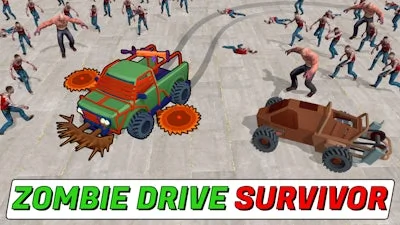
The apocalypse just got a horsepower upgrade. In Zombie Drive Survivor, you aren't just running from the undead—you're running them over. This high-octane Horde Survival experience puts you behind the wheel of a reinforced Car designed for one thing: total carnage. Face off against endless waves of monsters in a stylized 3D environment where the only way out is through. Whether you're smashing through crowds or Drifting around corners to avoid a fatal Crash, every second counts. Play it now on Pokid and see how long you can keep your engine roaring while the world falls apart.

Master the Chaos in Zombie Drive Survivor

Precision driving is the difference between a high score and a scrapyard. Use these controls to Destroy everything in your path:

  • PC Controls
  • W / up arrow key = accelerate
  • S / down arrow key = move backward
  • A / left arrow key = turn left
  • D / right arrow key = turn right
  • Space = handbrake
  • 1 = choose to take the left upgrade
  • 2 = choose to take the right upgrade
  • 3 = choose to take both upgrades
  • Mobile Controls
  • Switch toggle between D / R = move forward / backward
  • Tap on the left screen = turn left
  • Tap on the right screen = turn right (In mobile mode, the car accelerates automatically.)
Zombie Drive Survivor Gameplay

Pro Survival Tips for Pokid Players

Success in this Top-Down slaughter requires more than just a heavy foot. Your primary goal is to Collect EXP dropped by every Zombie you flatten. Leveling up allows you to pick powerful weapons that turn your vehicle into a rolling fortress. Start with basics and work your way up to machine guns, flamethrowers, rocket launchers, and harpoons. Keep a close eye on your vehicle's health; if your car takes too much damage, it's game over. Use the coins you earn from Killing streaks to unlock more durable cars with better stats. If you want to test your limits, switch from the standard levels to Endless Mode and see if you can survive the ultimate onslaught.

Stop walking and start driving. Head over to Pokid and start your engine in Zombie Drive Survivor today!

Instructions:

Controls

PC Controls

  • W / up arrow key = accelerate
  • S / down arrow key = move backward
  • A / left arrow key = turn left
  • D / right arrow key = turn right
  • Space = handbrake
  • 1 = choose to take the left upgrade
  • 2 = choose to take the right upgrade
  • 3 = choose to take both upgrades

Mobile Controls

  • Switch toggle between D / R = move forward / backward
  • Tap on the left screen = turn left
  • Tap on the right screen = turn right

(In mobile mode, the car accelerates automatically.)

Customise Consent Preferences Close

We use cookies to help you navigate efficiently and perform certain functions. You will find detailed information about all cookies under each consent category below.

The cookies that are categorised as "Necessary" are stored on your browser as they are essential for enabling the basic functionalities of the site.

Always Active

Necessary cookies are required to enable the basic features of this site, such as providing secure log-in or adjusting your consent preferences. These cookies do not store any personally identifiable data.

Functional cookies help perform certain functionalities like sharing the content of the website on social media platforms, collecting feedback, and other third-party features.

Analytical cookies are used to understand how visitors interact with the website. These cookies help provide information on metrics such as the number of visitors, bounce rate, traffic source, etc.

Advertisement cookies are used to provide visitors with customised advertisements based on the pages you visited previously and to analyse the effectiveness of the ad campaigns.

We also use third-party cookies that help us analyse how you use this website, store your preferences, and provide the content and advertisements that are relevant to you. These cookies will only be stored in your browser with your prior consent.

You can choose to enable or disable some or all of these cookies but disabling some of them may affect your browsing experience.