Add Me Up! – Puzzle Bliss from Pokid
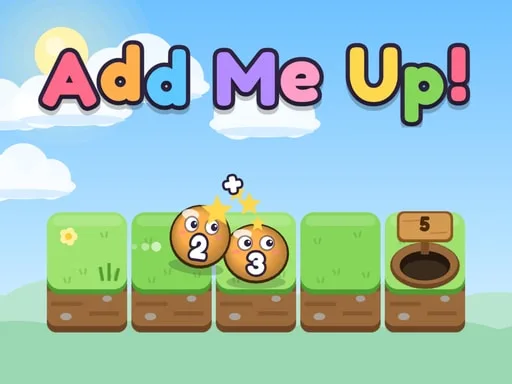
Every move you make sends all the blobs hopping in unison. Press an arrow and watch numbers collide, merge, and match the exact value a burrow demands. Solve 100 increasingly clever stages without timers or move caps. Each cleared level sharpens your brain, tests logic, and adds a dash of math fun. You’ll feel the rush when a perfect chain wipes the board clean.
Mechanics – How to Play Add Me Up!
Control the blobs with simple keyboard shortcuts. Master the commands, then craft your own challenges in the built‑in editor.
- PC Arrow keys or WASD move every blob one tile
- R restart the level
- M sound on or off
- Q or Esc back Menu
- Enter or Space presses Play
- L opens My levels
- Level editor click or drag to paint
- 1 to 4 pick Grass
- Erase Blob or Burrow
- Minus change
Strategy – Tips to Master Add Me Up!
Start each stage by scanning the board. Identify the highest numbers; they usually dictate the optimal path. Move blobs toward immovable obstacles to force merges that hit target values. When a burrow expects a 7, look for a 3 and a 4 nearby – a single push can create the needed sum. Keep the board tidy; excess blobs block future moves and waste space.
Upgrade your approach as you progress. Early levels rely on brute force, but later puzzles demand precise math chains. Use the editor to experiment with custom layouts. Try placing a series of low‑value blobs around a high‑value target; this forces you to think several moves ahead. The more you practice, the sharper your logical instincts become.
Remember to toggle the sound (M) when you need focus. A quiet session helps you hear the subtle click of each merge, a cue that your brain is processing the pattern correctly. If you hit a dead end, hit R and rethink the sequence. Each restart is a chance to apply a new tactic.
Ready to put your mind to the test? Grab Pokid’s Add Me Up! now, dive into the level editor, and share your creations with the community. Every puzzle you solve sharpens your logic, and every level you design fuels the next wave of brain‑boosting fun.
PC Arrow keys or WASD move every blob one tile R restart the level M sound on or off Q or Esc back Menu Enter or Space presses Play L opens My levels Level editor click or drag to paint 1 to 4 pick Grass Erase Blob or Burrow and minus change