Click to play
x
Controls

Controls

For the first player

  • A = Move left
  • D = Move right
  • W = Jump
  • S = Block
  • T = Punch
  • Y = Kick
  • U = Draw/Throw weapon

For the second player

  • Left arrow key = Move left
  • Right arrow key = Move right
  • Up arrow key = Jump
  • Down arrow key = Block
  • Num 4 = Punch
  • Num 5 = Kick
  • Num 6 = Draw/Throw weapon

Tips

You can combine buttons to do different moves, like pressing punch while blocking will result in a grab, or pressing punch and kick at the same time will release a special move (you'll need to have your power gauge under your HP to be red)

Dragon Fist 3

Dragon Fist 3

Dragon Fist 3
Click to play
This game is not available on mobile.
rotate phone

Pokid Presents: Dragon Fist 3 - The Ultimate Flash Fighting Experience

Get ready to rumble with the most intense fighting game of the year - Dragon Fist 3, brought to you by Pokid!

  • Master various martial arts and weapon types to take down your opponents in this epic showdown.
  • Choose from a diverse cast of characters, each with their unique abilities and fighting styles.
  • Go head-to-head in single-player mode, or challenge a friend in two-player mode to prove your skills.
  • Create your own fighter in character creation mode, with a wide range of customization options.

With a variety of game modes and an intuitive control system, Dragon Fist 3 is the perfect game for anyone looking to test their mettle in the world of fighting games.
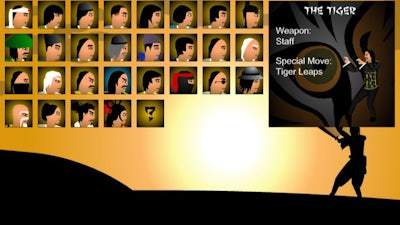
Dragon Fist 3 Gameplay

How to Play Dragon Fist 3

With a simple yet intuitive control system, playing Dragon Fist 3 is a breeze. Here are the basic controls:

  • Player 1: A = Move left, D = Move right, W = Jump, S = Block, T = Punch, Y = Kick, U = Draw/Throw weapon.
  • Player 2: Left arrow key = Move left, Right arrow key = Move right, Up arrow key = Jump, Down arrow key = Block, Num 4 = Punch, Num 5 = Kick, Num 6 = Draw/Throw weapon.

Tips:

  • You can combine buttons to perform different moves, like pressing punch while blocking for a grab, or pressing punch and kick at the same time for a special move.
  • Keep an eye on your power gauge to unleash powerful special moves.

With these simple controls and a deep understanding of the game mechanics, you'll be able to take your gameplay to the next level and become the ultimate Dragon Fist 3 champion!

Don't wait any longer to experience the thrill of Dragon Fist 3. Visit Dragon Fist 3 today and discover a whole new world of Flash fighting action!

Instructions:

Controls

For the first player

  • A = Move left
  • D = Move right
  • W = Jump
  • S = Block
  • T = Punch
  • Y = Kick
  • U = Draw/Throw weapon

For the second player

  • Left arrow key = Move left
  • Right arrow key = Move right
  • Up arrow key = Jump
  • Down arrow key = Block
  • Num 4 = Punch
  • Num 5 = Kick
  • Num 6 = Draw/Throw weapon

Tips

You can combine buttons to do different moves, like pressing punch while blocking will result in a grab, or pressing punch and kick at the same time will release a special move (you'll need to have your power gauge under your HP to be red)

Customise Consent Preferences Close

We use cookies to help you navigate efficiently and perform certain functions. You will find detailed information about all cookies under each consent category below.

The cookies that are categorised as "Necessary" are stored on your browser as they are essential for enabling the basic functionalities of the site.

Always Active

Necessary cookies are required to enable the basic features of this site, such as providing secure log-in or adjusting your consent preferences. These cookies do not store any personally identifiable data.

Functional cookies help perform certain functionalities like sharing the content of the website on social media platforms, collecting feedback, and other third-party features.

Analytical cookies are used to understand how visitors interact with the website. These cookies help provide information on metrics such as the number of visitors, bounce rate, traffic source, etc.

Advertisement cookies are used to provide visitors with customised advertisements based on the pages you visited previously and to analyse the effectiveness of the ad campaigns.

We also use third-party cookies that help us analyse how you use this website, store your preferences, and provide the content and advertisements that are relevant to you. These cookies will only be stored in your browser with your prior consent.

You can choose to enable or disable some or all of these cookies but disabling some of them may affect your browsing experience.