Rabbitii: A Retro‑Pixel Platformer That Packs Punch
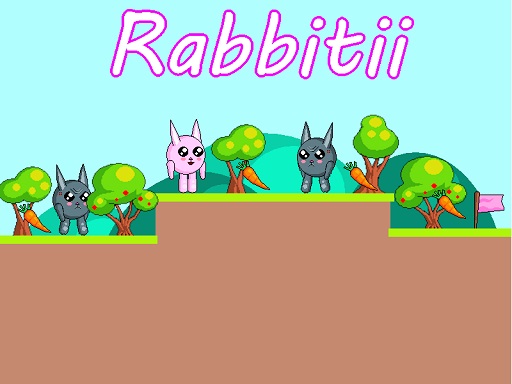
Rabbitii drops you into a crisp 2D adventure where every hop counts. You play as a cute, carrot‑hunting rabbit racing against dark‑colored foes and deadly spikes. The goal? Snag every carrot, dodge the enemy rabbits, and dash to the pink flag before the timer runs out. With eight escalating levels, the game cranks up the challenge while keeping the arcade feel tight and satisfying. It’s a perfect fit for anyone who loves a fast‑paced, single‑player platform experience that feels like a throwback to classic pixel titles. If you’re after a quick, rewarding fix that blends retro charm with modern polish, Rabbitii delivers.
Mechanics
Controls are stripped down to the essentials. Move left or right, then jump, double‑jump, and repeat. The whole game runs on a simple keyboard layout that feels natural from the first hop.
- Use WASD or Arrow keys for the player’s movement
- Use W or Up arrow key twice for double jump
Strategy
Mastering Rabbitii isn’t just about reflexes; it’s about reading each level’s layout. Start each stage by scouting the placement of carrots and enemy rabbits. Prioritize the nearest carrot, then plot a route that lets you chain jumps without landing on spikes. Keep an eye on the pink flag—it often sits just beyond a tricky platform that demands precise timing. Use the double‑jump to bypass clusters of enemies, but save it for moments when a single hop won’t cut it. Collecting every carrot unlocks hidden bonus rooms, so don’t rush past a shiny orange treat. As you progress, the pixel art grows more detailed, and the platforming puzzles become tighter, rewarding careful planning with higher scores and brag‑worthy leaderboards.
Ready to prove you’ve got the reflexes and smarts to dominate this arcade‑style adventure? Jump into Rabbitii now, and let Pokid’s signature cute‑cartoon charm push your platforming skills to the limit. The pink flag is waiting—don’t let it slip away.
Use WASD or Arrow keys for the player s movement Use W or Up arrow key twice for double jump